Adobe Firefly Services · Forward Deployed Engineer — assessment, in one place
FDE Social Content
Agentic Automation & Analytics
A campaign brief goes in. An organized folder of on-spec, checked, localized social creatives comes out — every product, every market, every aspect ratio — from as few generative calls as the brief actually requires. Then two scheduling engines turn evidence into a dated, per-channel campaign: stills and Veo-rendered video, every deliverable measured against brand, legal and spec rules on the rendered pixels.
Everything on this page is real output from the working application — the screenshots below were taken from live runs, not mockups. Built by Douglas McKay for the Adobe Firefly Services FDE take-home.
The run in numbers
Two products, three markets (en-US, ja-JP, de-DE), three aspect ratios. One product ships an approved photo — it is reused, never regenerated. The other is generated once at master resolution; every deliverable is composed locally from that one call. The suite of automated tests runs offline with no API key and no pytest.
Video walkthrough
What the assessment asked for
How to use it — step by step
Run start.bat (Windows) or
start.sh (macOS/Linux). It checks three dependencies, starts a local server and
opens the tool as its own application window. No key is needed — the offline provider
renders real pixels deterministically; add a key and the same brief runs against a real model.
Launch — a real startup sequence
The splash lists what is actually initialising — server, providers, storage, brief. Each line ticks when its request returns and turns red with the reason if it fails, so “none configured — offline renderer only” is said out loud instead of discovered mid-run.
The brief — form and YAML, same file
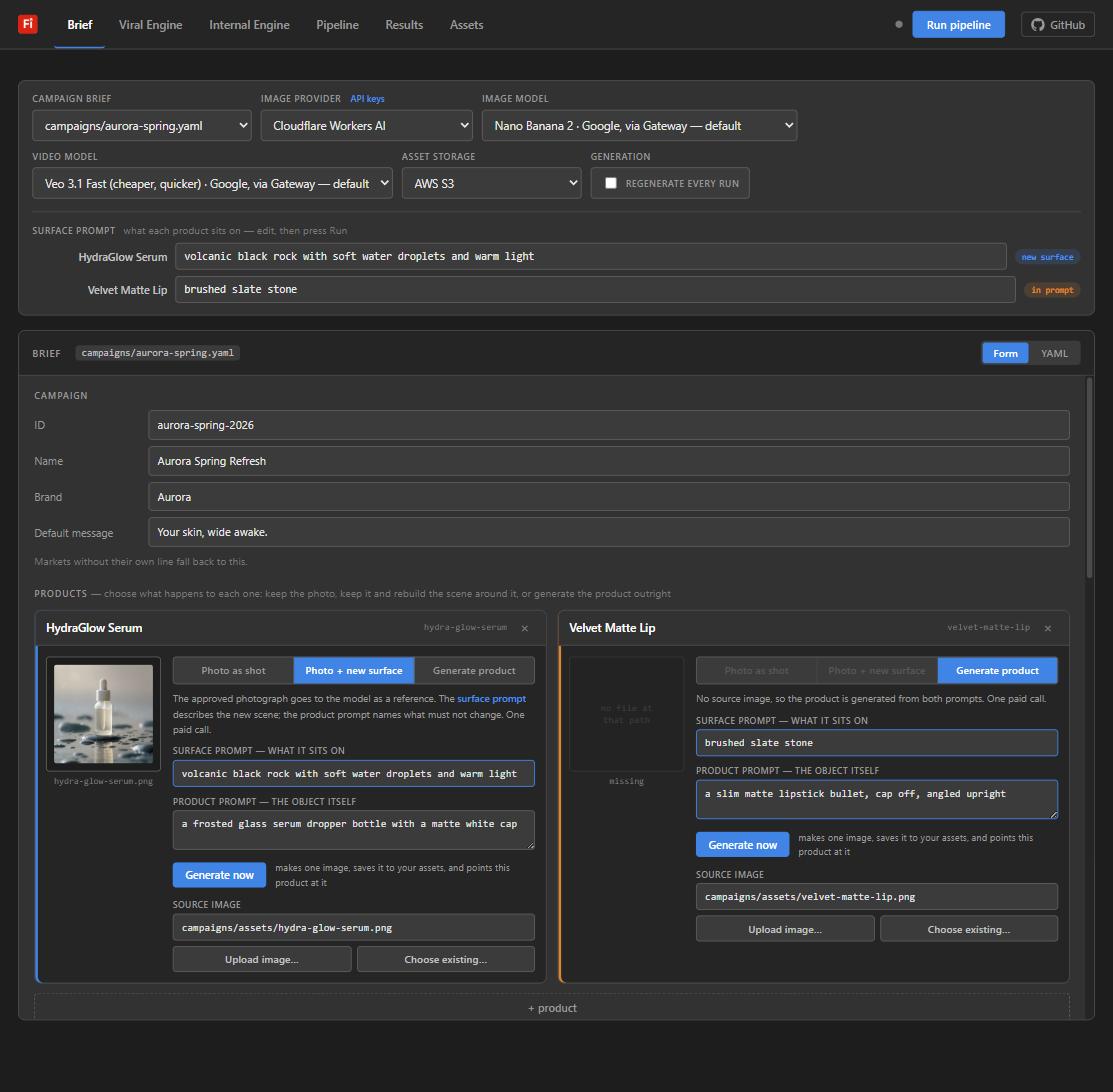
Products, markets with locale-aware regions and audiences, aspect-ratio presets, prohibited terms. The form is a view over the YAML — every edit regenerates the file, parsed server-side by the same PyYAML the pipeline imports. Each product carries a three-position switch: photo as shot (0 calls), photo + new surface (the approved shot goes to the model as a reference image — only the scene changes), or generate product.
Run — a flow canvas driven by real events
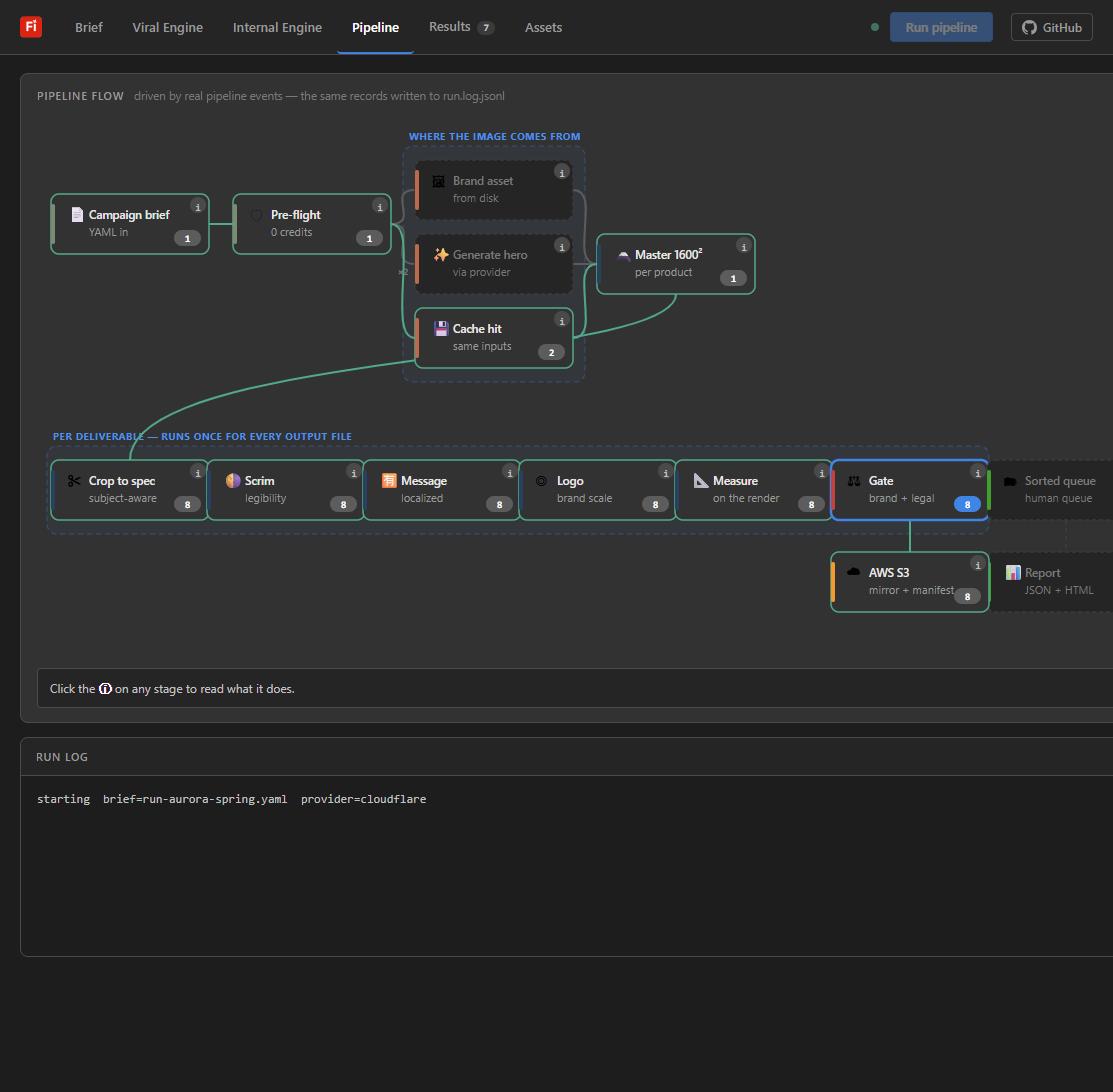
Press Run pipeline. The node graph is fed by the pipeline’s own event log
— the same records written to run.log.jsonl — so nothing on screen is
on a timer and a stage that did not happen cannot light up. Note the cost decision on the
left: brand asset from disk → cache → generate, in that order.
Results — a review queue, not an auto-approval
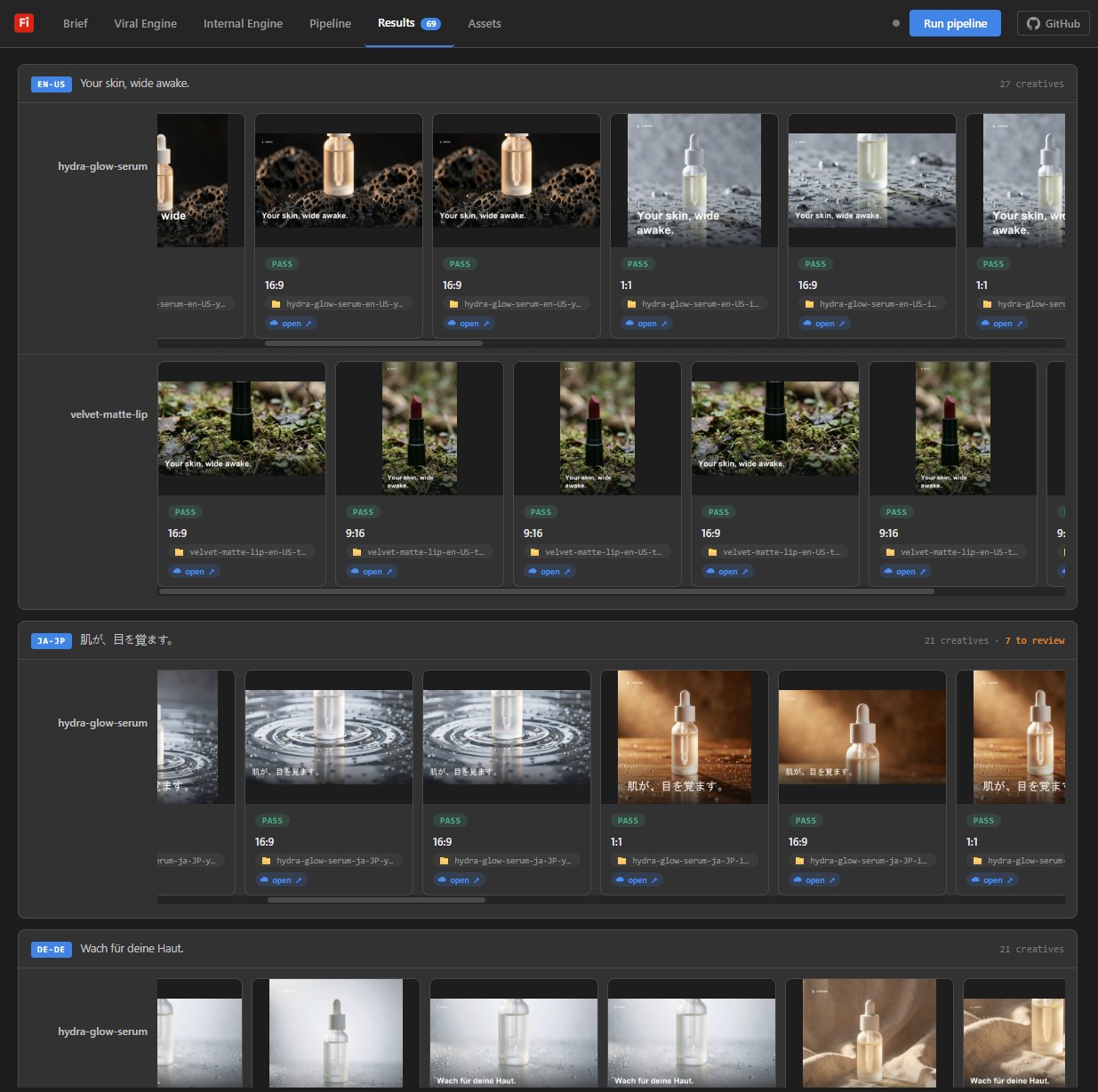
One row per market, each deliverable carrying a verdict and a compliance score. The stage strip shows what every compose stage did to the selected creative — and every number on it is the number the code ran on, read from the same constants the compositor uses. Nothing is auto-approved and nothing fails open: blockers and majors route to named desks.
Viral Engine — cost before commitment
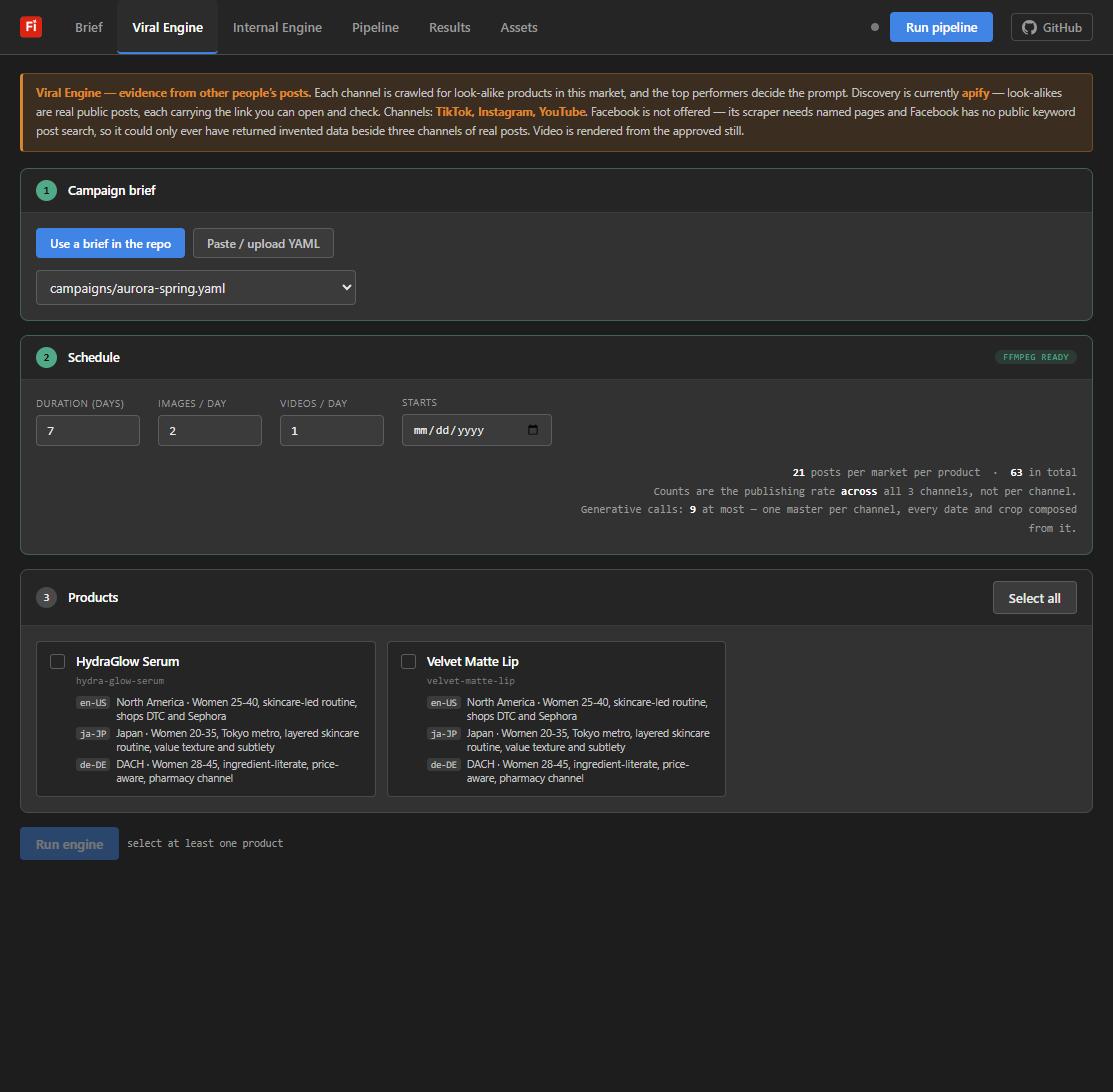
Pick a brief, set duration and images/videos per day, tick products. The arithmetic updates as you type, before the button that spends anything: posts per market, total posts, and the worst-case generative call count — one master per channel, every date and crop composed locally from it.
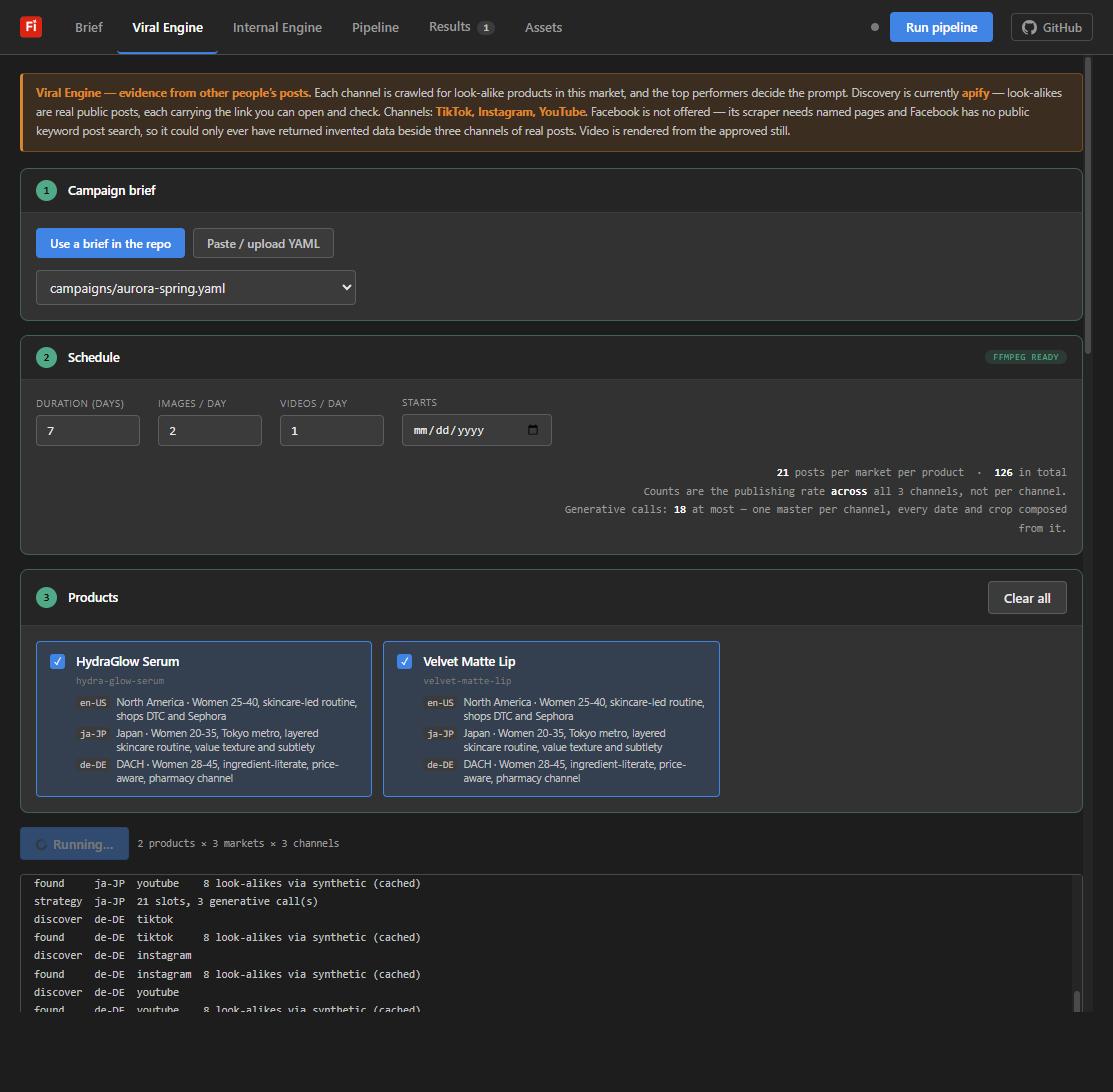
Viral Engine running — discovery you can audit
Per product, per market, per channel: crawl look-alike products, fold in our own channel history, emit one strategy, spend one generative call on the master, compose every slot locally, then render video slots from the approved still. The live log names every step and every fallback.
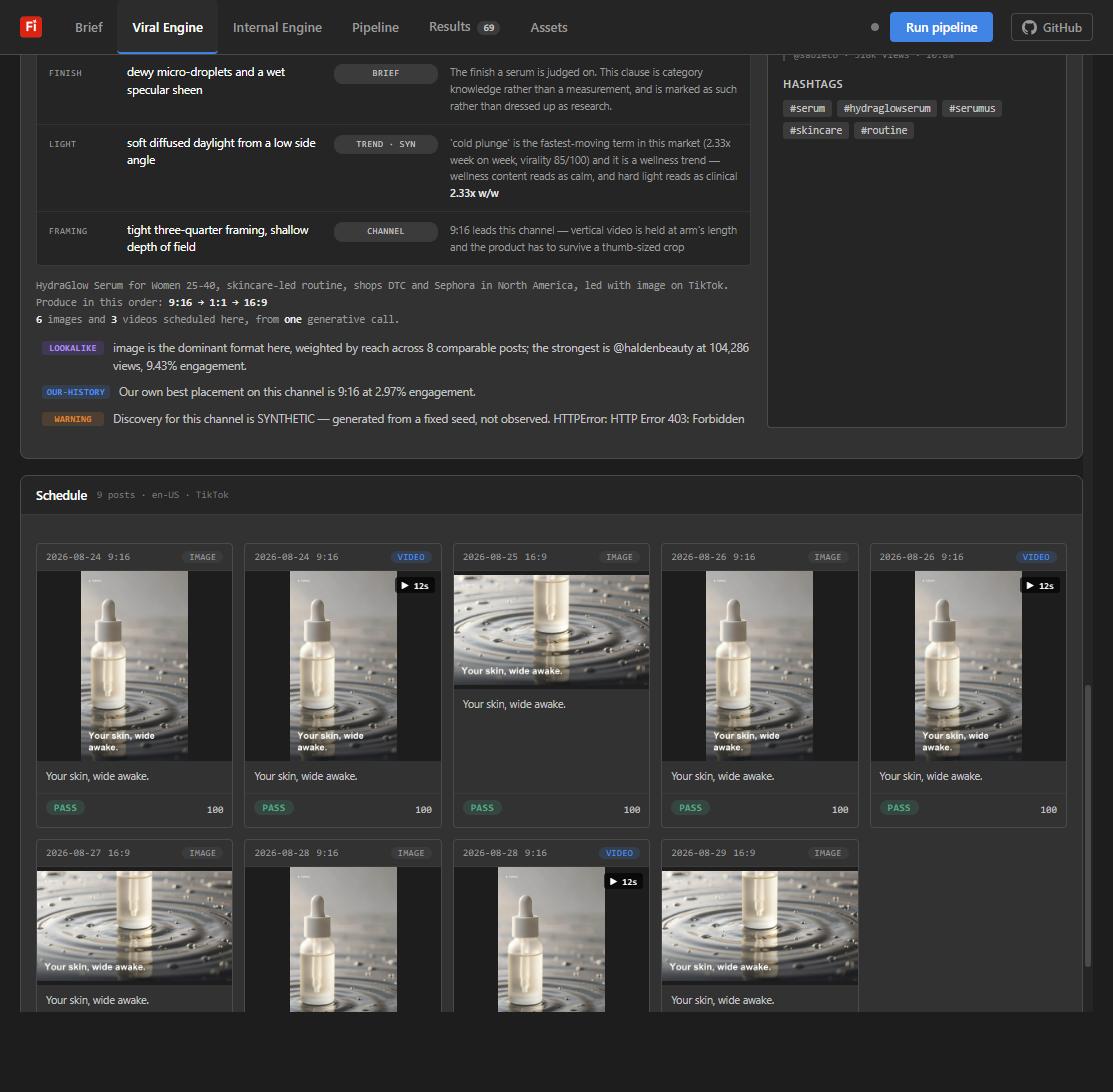
The strategy — every clause carries its evidence
Each channel’s prompt is assembled clause by clause, and the Why this prompt table says where each clause came from — a look-alike post (attributed, with its reach), the brief itself, a market trend, or the channel’s own format rules. Competitor hooks are shown as reference and never used as our caption. Evidence is labelled OBSERVED or SYNTHETIC, and a failed live crawl falls back with the reason on screen instead of failing the run.
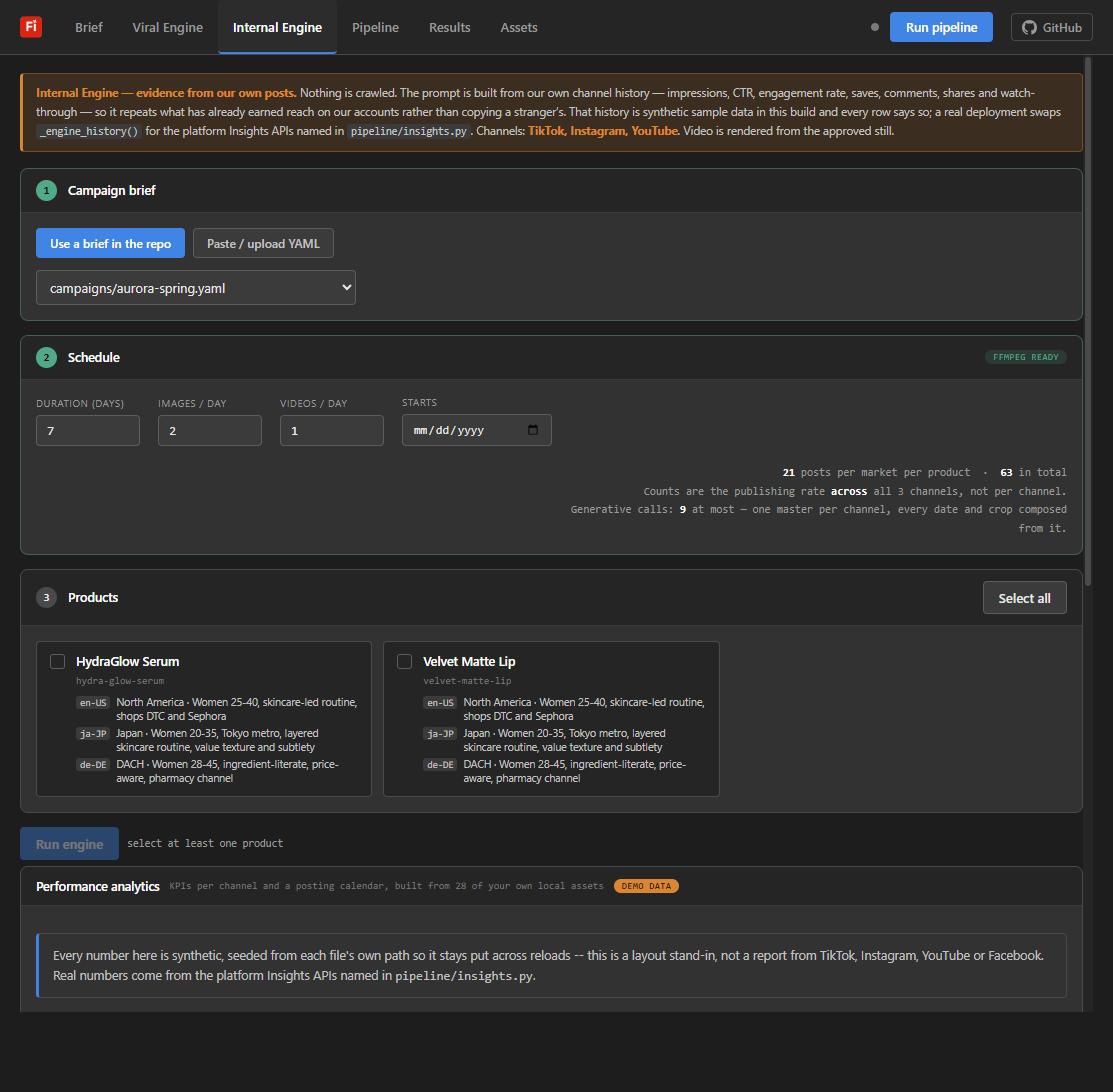
Internal Engine — our own history instead of the crowd
The same machinery pointed inward: nothing is crawled, and the prompt is built from what has
already earned reach on our accounts. In this build that history is synthetic sample data and
every row says so — a real deployment swaps one function for the platform Insights APIs
named in pipeline/insights.py.
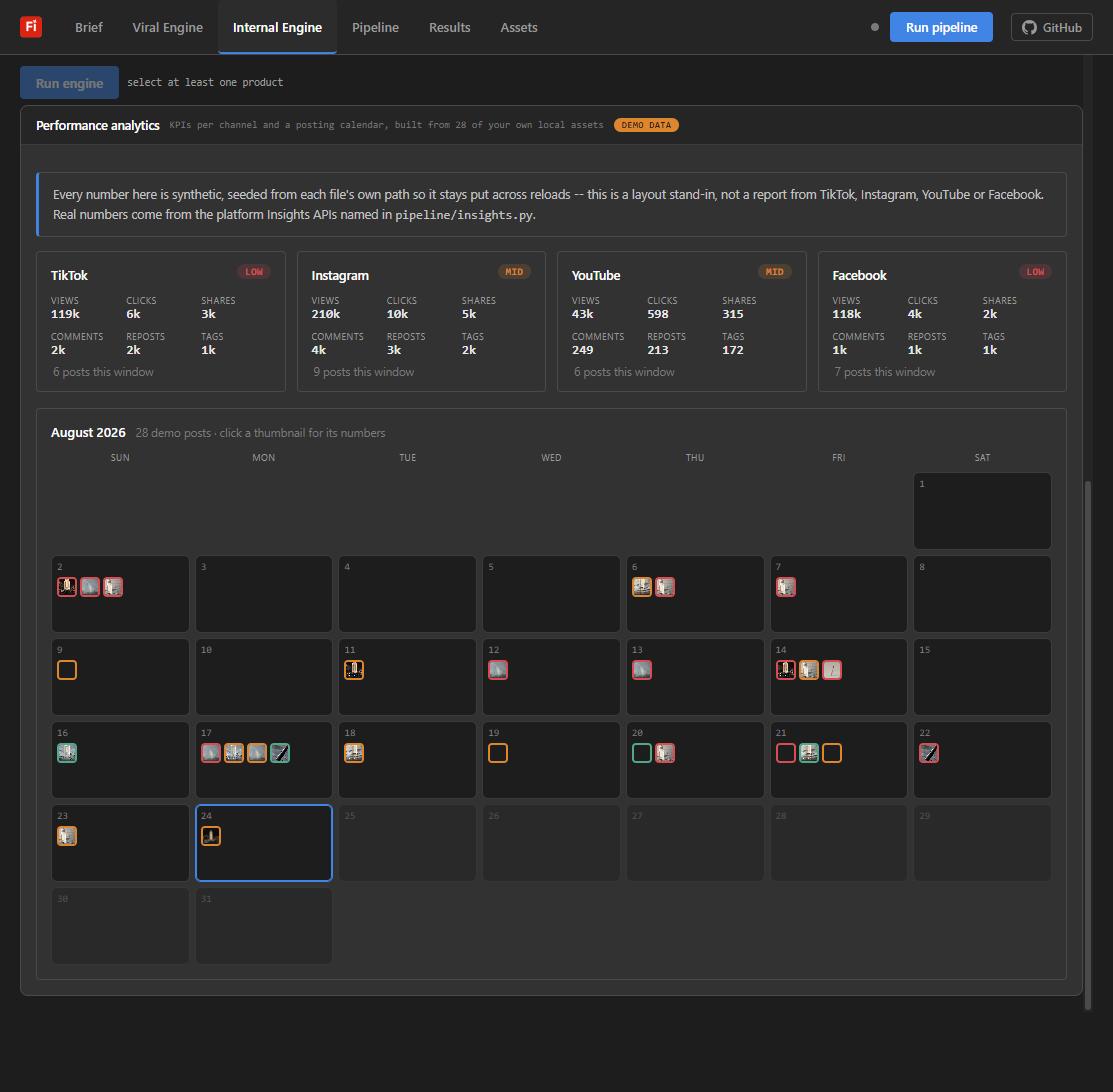
Performance analytics — the loop closes
Per-channel KPI cards and a posting calendar built from the asset library, with each post’s numbers one click away. Posts are tiered high / mid / low by engagement, colour-coded and labelled. The banner is doing the honest work: these numbers are seeded demo data standing in for the Insights integration, and the page says so on its face.
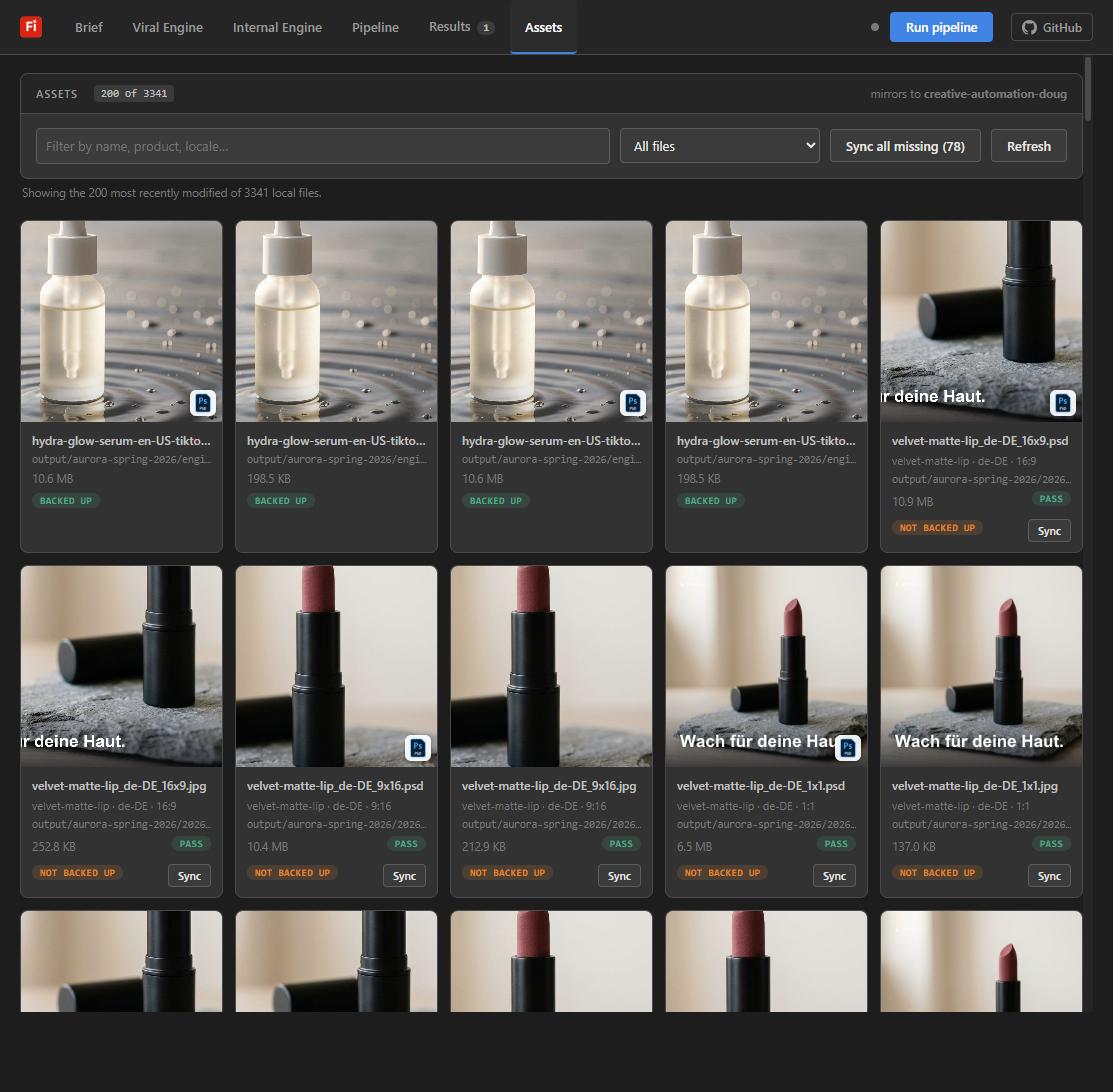
Assets — everything produced, in one library
Every produced file with its verdict, size and S3 backup state — layered .psd beside every flattened creative so the copy stays editable, one-click sync for anything not yet mirrored.
Reading the audience out of the brief
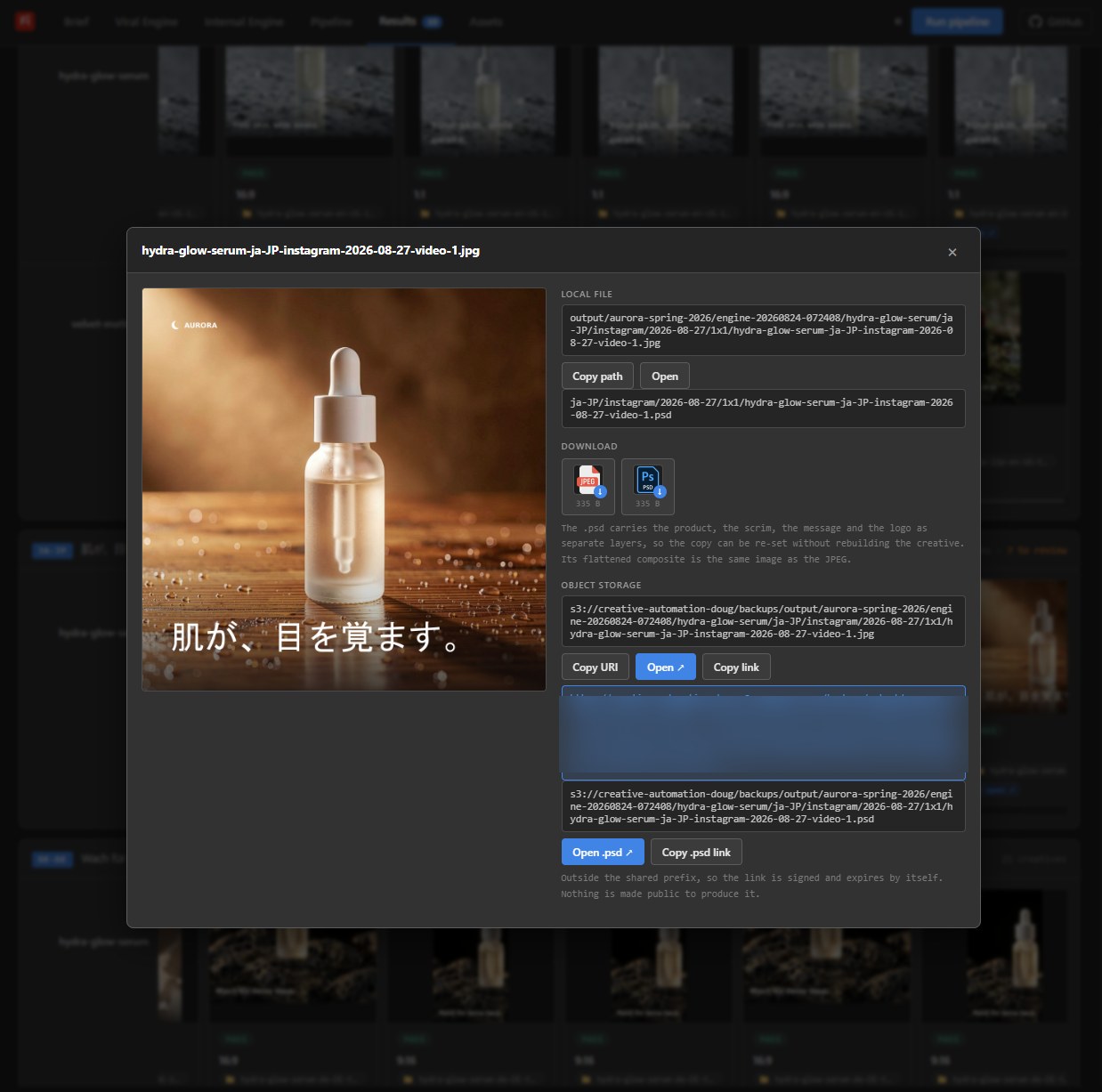
Every market in the YAML carries more than a language code — it names who the campaign is for, written by someone who knows the market:
markets:
  - locale: ja-JP
    region: Japan
    audience: "Women 20-35, Tokyo metro, layered skincare routine,
               value texture and subtlety"
    message: "肌が、目を覚ます。"
That one stanza steers the whole system. Discovery crawls Japan for look-alike products reaching that audience; the strategy weights warm, tactile, subdued surfaces because the audience line asks for texture and subtlety rather than a hard sell; and the compositor sets the message the brief’s author wrote in Japanese — with the font resolver verifying it can draw every character before a single pixel ships, so the failure mode of localized creative (tofu boxes where the copy should be) cannot reach a deliverable. The result below is what came out for the Instagram 1:1 slot: the same approved product, re-read for a Tokyo audience.
What the two engines measure
What comparable products are doing
Each channel is crawled for look-alike posts in the target market (TikTok, Instagram, YouTube — via hosted Apify actors, with a deterministic synthetic floor). From each post the engine keeps only what a caption and its counters can honestly give:
- Reachviews per post, used to weight which look-alikes matter
- Engagementengagement rate per post (likes + comments + shares over views)
- Formatimage vs video share among top performers — decides what leads the channel
- Ratiowhich aspect ratio leads (9:16 vs 1:1 vs 16:9) and the produce order
- Cadenceposting rhythm of the winners, folded into the schedule
- Hooksthe wording of top captions — shown as attributed reference, never used as our copy
- Trendsfastest-moving market terms with week-over-week velocity and a virality score
A scraped caption cannot describe its own art direction, so look-alikes decide format, ratio priority, cadence and hook style — the surface treatment comes from our own measured history unless a caption literally names a material. Every strategy clause cites its source and whether it was OBSERVED or SYNTHETIC.
What has already worked on our accounts
Nothing is crawled. The strategy is built from our own per-channel history — so it repeats what earned reach on our accounts rather than copying a stranger’s:
- Impressionsdelivered reach per post and per placement
- CTRclick-through rate per creative treatment
- Engagementengagement rate by placement — our best 9:16 vs 1:1 vs 16:9
- Saves / sharesthe compounding signals, kept separate from likes
- Watch-throughvideo completion, which decides whether video leads at all
The Performance analytics section closes the loop the brief’s fifth business goal asks for — per-channel KPI cards (views, clicks, shares, comments, reposts, tags) and a posting calendar tiered high/mid/low by engagement.
Said on-screen, not in a footnote: in this build the channel history
and analytics numbers are synthetic and labelled DEMO DATA; pipeline/insights.py
names the real platform Insights API a production deployment would call for each network.
Key design decisions
The naive pipeline generates product × market × ratio. This one generates one master per product that lacks an asset, then crops, scrims, localizes and brands every deliverable locally — 18 files from at most 2 calls on the sample brief. At Firefly Services’ documented 4 requests/minute, a wasted call is a wasted minute.
Image providers (offline mock, Cloudflare Workers AI, Gemini, Firefly Services v3 async), storage (local always, hand-rolled SigV4 S3 mirror — no boto3), and discovery (Apify, Playwright, synthetic) are all swappable by flag, not refactor. A reviewer with no credentials gets a complete run; a key upgrades the same brief to a real model.
Logo presence, clearspace, palette distance, message legibility and delivered pixels are checked on the composed file, not the YAML — a checker that reads the brief goes green while the artwork is wrong. Nothing is auto-approved; nothing fails open. If a rule raises, the asset routes to review.
The brief carries native copy per market; the failure mode that actually ships is tofu. The font resolver verifies the chosen face can draw every character in the string (ja-JP ships in Japanese) and raises rather than rendering empty boxes.
Seeds derive from the variant id — the same brief regenerates the same pixels, so six months from now “why does this asset look like this” has an answer. Verified against the live endpoint: same seed, byte-identical images.
Synthetic data says SYNTHETIC on screen. A failed scraper falls back and prints why. A resurfaced product counts as a paid call. The README leads with assumptions and limitations — because most of them are where the real engagement work would start.
Get the code
pip install -r requirements.txt,
run start.bat / start.sh — it works out of the box.